A very simple trick to find a file's full path
Hi friends. I'll introduce you to a very nice Windows trick that lets you find the full address of a file. For example, when you're in a particular program and need to give it the address of a file (say, a picture), you have to go to the file and copy the address from the top of Explorer, but this address is incomplete, for example: D:\folder1\folder2 Then you have to type the picture's address manually or copy that too. But if you hold the Ctrl + Shift keys on your keyboard and right-click on the file, a menu opens whose options are a little different from the usual menu. Look for Copy as Path among those options and click it. In the picture below you can see this option is there, in Persian of course:
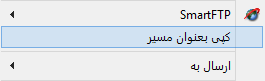
After doing this, the full address is copied. For example: D:\folder1\folder2\image.png Good luck and success