How to stop typing the same passwords over and over in WinRAR
Hi dear friends. You may also have noticed that when you download files from various sites, they come as ZIP or RAR archives and also have a password, which is usually the site's address. You shouldn't be annoyed at the sites for adding these passwords. The reason is so the files don't get infected with viruses and so the cracks inside the archive don't get deleted by antivirus software.
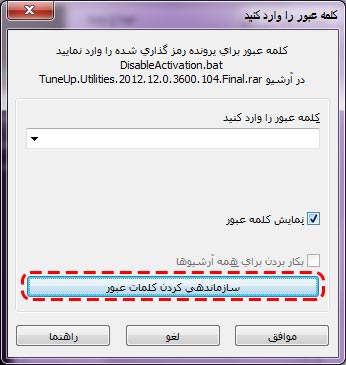
To put your mind at ease, when WinRAR asks you for a password, click the big button at the bottom:
(My computer's copy of the program was in Persian, which is no problem; you can easily figure out the English equivalents.)
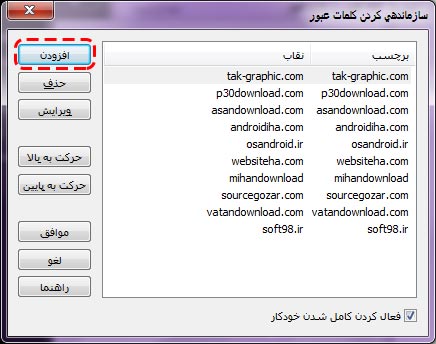
Here you can see your list of passwords.
Click the Add button:
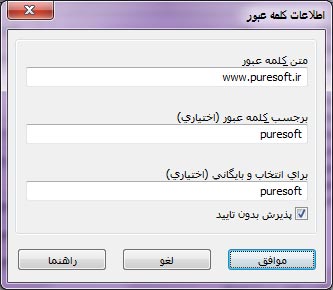
In the window that opens, enter the password in the first box, and in the next boxes enter the label that should be saved so that typing it gets replaced by the password. For example, here the password is www.puresoft.ir, but the label I chose is puresoft. That means if a file's password is www.puresoft.ir, typing puresoft in the password box opens the file, and WinRAR even makes it easier: when you type the letter p, it suggests all the labels starting with p one by one.
In the picture below you can see how to save a password:
Now clicking the OK button saves the password:
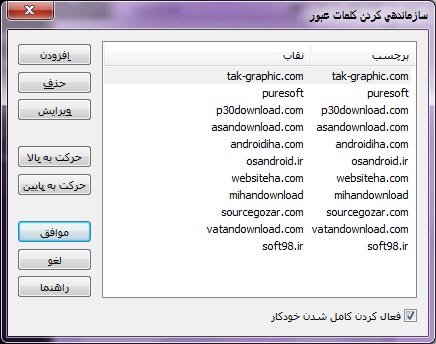
Now click OK in this window too so the password is saved and suggested to you from now on. Good luck...