Reducing a picture's file size with the least loss of quality
Hi, one of our friends asked how to reduce the file size of very high-quality pictures without lowering their quality, so they can be uploaded. There are lots of programs for this, but one program you'll find on almost every computer is Photoshop, so it's the best option. Open Photoshop and select the picture you want...
Then choose Save for Web and Devices from the File menu, as in the picture below
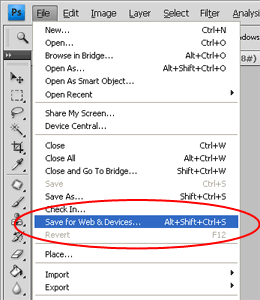
Well, now you've done 50 percent of the work of reducing the picture's size! You can use the options in this window to reduce the size, and notice that in the bottom left it shows the picture's file size, and you can even set it to show, for example, how many seconds it takes to load on a 256 kbps connection. Try shrinking an unimportant picture with this method and keep practicing until you get used to this window. This window is one of the most important parts of Photoshop for webmasters. Also, you don't need to go through the menu above to open it; just hold Alt+Ctrl+Shift+S together and this window opens. I hope you got your answer, Ms. Sara, and I wish you all success. Goodbye