Speeding up a SATA hard drive
Hi. One thing everyone cares about is having a fast computer. There are many ways to speed up a computer, and one of them is speeding up the hard drive. Old hard drives, the IDE ones, were slow and connected to the motherboard with thick, big cables, but today's SATA drives, which connect to the motherboard with a much smaller cable, are much faster than IDE. Many of you may have this kind of drive in your computer but not know that besides having the drive, your motherboard's Setup settings also need to be set for it. On many computers, when you press the Del key while turning on the computer, go to the Advanced section and select the hard drive, a box opens whose first option is IDE Type and second option is ADCHP, and unfortunately it's set to IDE Type, which uses your SATA drive as IDE. This keeps your drive from performing as well as it should.
But the ADCHP option makes the drive use a newer technology and run faster. A very important point here, though, is that only Windows Vista and 7 are compatible with this technology, and other operating systems don't support it. If you're using a version of Windows other than Vista or 7, choosing this option will break your Windows. I recommend setting this option to ADCHP before installing Windows and then installing Windows 7. When you install your motherboard driver, a new program is added to your system called Rapid Storage Technology, or RST, which sits next to the Windows clock.
Clicking this icon opens a program made by Intel, which has some settings for the SATA ports that I recommend you don't touch.
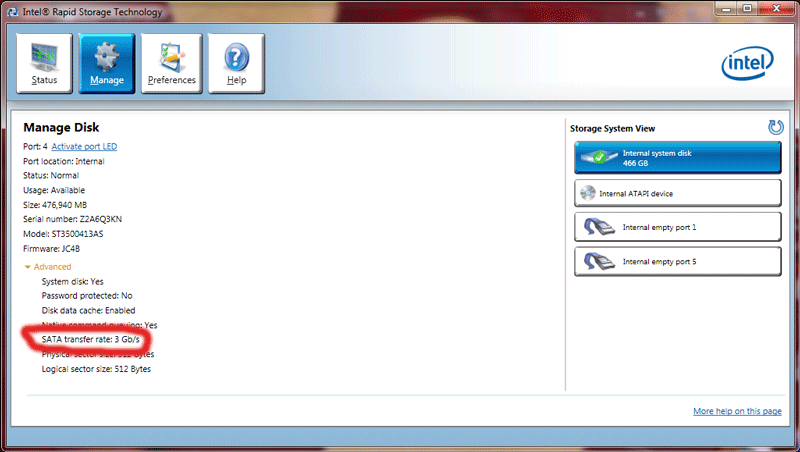
As you can see in the picture below, the hard drive speed of this computer reached 3GB per second using this technology!
 I hope it was useful...