Keep several items in the Windows clipboard at once!
Hi to all my dear friends.
I hope you're having a good time.
It may have happened to you that when you copy a text or file, copying another text or file wipes out the previous one. That's because the Windows clipboard can only hold one piece of data at a time; as programmers say, it's a Union.
Now I'll introduce a very simple program that lets you get many times more use out of the clipboard.
This program is Shape Shifter, which is free and doesn't need a crack, and I've put its download link from p30download (an Iranian download site) at the end of the post.
This program is small and needs to download some data from the internet, so you need an internet connection for it to work.
Once you install it, its icon appears next to the clock, and by looking at it you can tell how many clipboard items there are right now.

The first time you install the program, it asks how you want to use it, and by default it recommends the option where you hold Ctrl+V. I used this option and it was good.
It has some other settings too, which are a matter of taste, and you'll figure them out yourself.
To use this program, just copy the data you want, and when you want to paste it, hold Ctrl+V (don't release) until a box like the one in the picture appears:
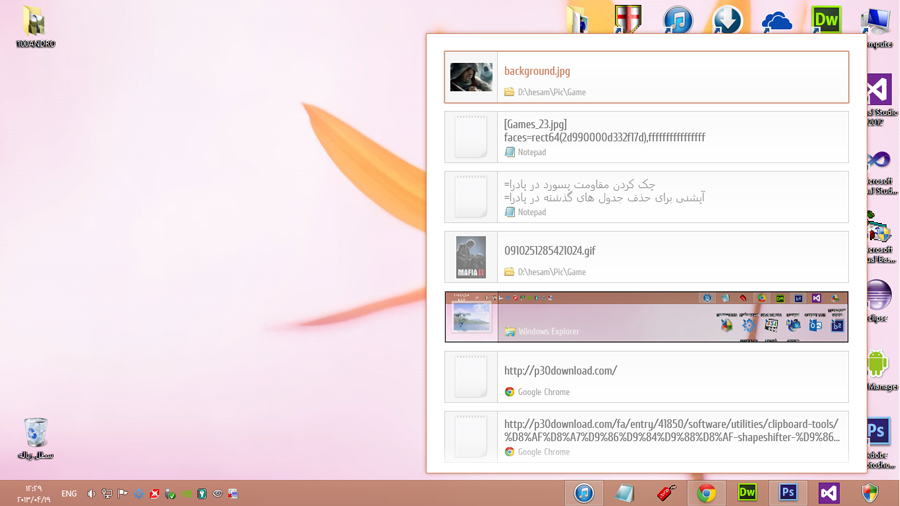
Then you can see everything you've copied to the clipboard, select items by clicking on them, and when you release Ctrl+V you'll see them pasted.
Of course, note that this program has a limit too; I think it shows up to 100 previous copies at most and deletes older ones (which itself is a lot: a clipboard a hundred times bigger!)
Keep in mind that using this program may be hard at first, because you've worked with the old Windows clipboard for a long time and aren't used to this, but after a day or two you'll be completely familiar with it.
You can download the latest version from here:

Good luck and success...