How to see the files we want when the computer turns on
Hi to all my friends. In this post I want to tell you how you can see a picture, video, song or anything you like when your computer turns on.
Doing this is very simple: you need to find a folder called Startup in the Start menu and put any file you want to run in it. In the picture below you can see where the folder is:
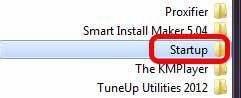
If this folder doesn't exist in the Start menu, right-click on All Programs and choose Open. Then in the window that opens, create a new folder called Startup and put the files you want in it. After you turn your computer off and on again, you'll see that whatever you put in this folder opens. I hope this post was useful for you...