Shutting down computers on a network without any program
Hi to all my friends. It may have happened to you that at university, a gaming cafe or anywhere else where computers are on a network, you want to tease the others a bit! There are lots of programs for this, but I'll tell you a way to shut down or restart other computers on the network without any program, using Windows itself. To do this, first open the Run box. You can hold the Windows logo key and the R key on your keyboard at the same time.
Now type shutdown -i and confirm, as in the picture below:
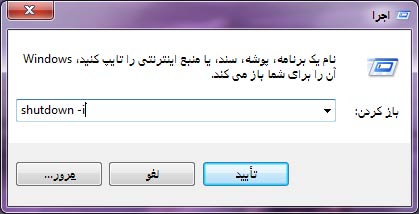
After doing this, a small program opens that you can use to shut down or restart computers on the network.
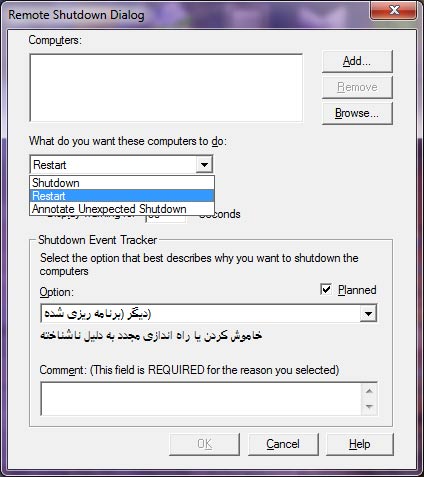
You can add computers with the Add button. With the first drop-down list you can choose the type of shutdown. Below that drop-down there's an option that, if you uncheck it, makes the other computer shut down without any particular message; if it's checked, a message is shown too. Below that option there's another box where you can set the shutdown delay in seconds. The second drop-down asks for the reason for the shutdown, which you can disable. The text box at the bottom is for comments about the shutdown, and all of these are disabled by unchecking the Planned option. Good luck...