How to create a channel in Telegram
Hello dear friends, I hope you're well
In this post I want to talk to you about how to create a channel in Telegram.

As you know, one of Telegram's features is that you can create a channel and use it to send messages to the people you want, all at once.
In this post we'll go step by step through how to create a channel using the Telegram Android app. The version of the Telegram app I used to prepare this tutorial is 3.2.4. There's an important point here: if you're using an old version of Telegram, you need to update it. In previous versions of Telegram, instead of channels there was a feature called Broadcast message, which has now been replaced by channels. So both you and the people who want to use your channel need to update their Telegram.
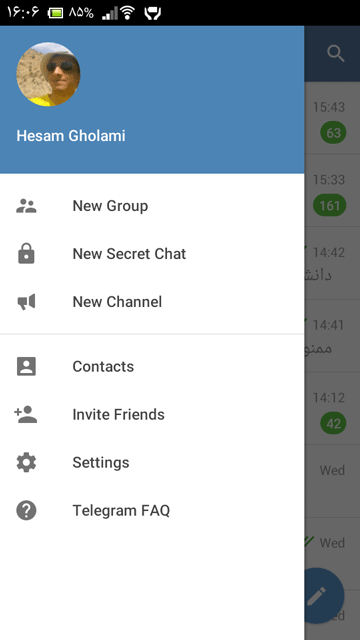
To create a channel, first open the Telegram menu by swiping your finger from left to right. Now choose New Channel, as in the picture below:
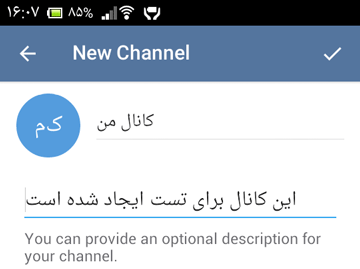
Choosing this option opens a box where you can enter the channel's name and its description. In this test we'll name the channel "My Channel":
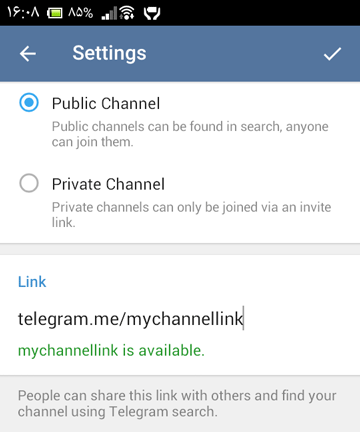
By tapping the check mark at the top, we go to the next step, where we need to choose the channel type. Telegram channels come in two types, Public and Private. Public means a channel that anyone can join; it has a fixed link like http://telegram.me/link, and you can give this link to your users on the internet or anywhere else, and they can join your channel through it. A Private channel, however, doesn't have a fixed link, and you can create different invite links so only the people you want can join the channel. Most of the time people prefer to create a Public channel so they can give its link to everyone to join easily. If you're unsure which option to choose, just choose Public. After you choose the Public type, you need to design the link so you can give it to your users. For example, here we chose the rest of the link as "mychannellink". So our link was created as http://telegram.me/mychannellink, and after we create the channel we can give this link to our users so they join our channel. The picture below shows this part:
Now we need to choose the people we want to join our channel right away. At this step Telegram shows you the list of people in your phone book who are on Telegram, and you can choose the people you want to join your channel. Of course, at this step you can also choose no one, because people can join the channel later through the link we created. So we skip this step and press the confirm button.
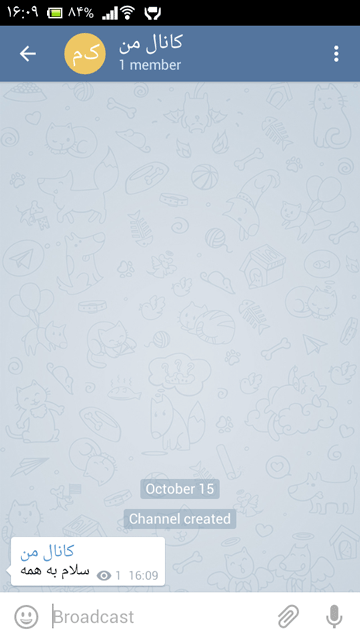
Now your channel has been created and you can send your messages:
Below I'll point out some of the features of Telegram channels.
- In a channel only admins can send messages, and users can only view the messages
- Users who join the channel don't have to be in your phone book; all Telegram users can join the channel
- Unlike groups, a channel doesn't have a 200-member limit, and your channel can have thousands of members
- Users who have just joined the channel can see the previous messages too
- You can give your channel's link to your users anywhere (such as the internet, text messages, email, inside other messaging apps and so on)
- Regular users can't see the channel's members, but admins can see the list of channel members
Telegram channels are one of the good ways to gather your customers and keep them informed. For example, if you have a store, you can write the invite link to your Telegram channel on your store's door and on your business card and give it to your customers, and by joining your channel they can stay informed about your products and the announcements you make.
Also, try not to bother your users with unimportant, back-to-back messages, because that way you'll easily lose your channel's members.
I hope this post was useful for you and that you can create good, useful channels and make good use of this Telegram feature. If you think some part of the tutorial needs improvement, please tell me in the comments to help make this post better.
Good luck and success