A very simple trick to swap copy with cut and vice versa
Hi everyone
One way to move files is Drag and Drop: you can drag a file and drop it somewhere else to move it. But if you've paid attention, sometimes these files get copied and sometimes they get moved, or cut. The reason is that files moved to or from the desktop are always copied, and files moved between two open windows are always cut.
In the picture below you can see that I'm dragging a picture from a folder onto the desktop and the file gets copied:
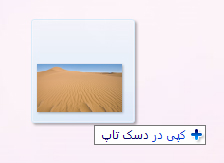
Now if we hold the Shift key on the keyboard while dragging the file from the folder to the desktop, we can easily cut the file and move it to the desktop, like the picture below:

I hope you enjoyed it...