Microsoft's promising changes in Visual Studio 2013
Hello dear friends, I hope you're well
In this post I want to talk about the new version, Visual Studio 2013.
As you know, Microsoft released Visual Studio 2013 right after the 2012 version, which was a bit surprising. I installed it too, but it had so many problems that I couldn't use it and kept using the 2012 version, until Update 1 for the 2013 version fixed many of its problems and I was able to use it.
In this version Microsoft finally swallowed its pride and, several years late, added to Visual Studio things that even some open source text editors had.
Below I'll point out a few of them that I came across.
The most important of these, which used to really tire programmers out, is turning one quote " into two quotes "" (and other similar characters like ' and {), which has been added to Visual Studio 2013.
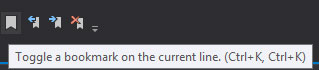
Another useful feature added to this version is the ability to bookmark code, which can help you mark a section you need to work on later, or important sections.
Another new feature has also been added to Visual Studio that can be very useful, and that's the scroll bar syncing with the code, so that through the scroll bar you can see where your code has errors or hasn't been saved, and so on...
In the picture below you can see the scroll bar:
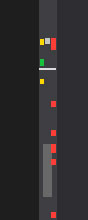
The red part is for lines that have errors
The yellow part is for lines that have changed but haven't been saved
The green part is for lines that have changed and have been saved
The white part between the red and yellow is a bookmark
And finally, the white line that spans the width of the scroll bar (under the green part) shows the current position of the cursor.
Also, features that existed in Visual Studio 2012 have been carried over to this version with some minor improvements, which you're surely familiar with, like CodeMap, Quick Launch and so on.
I hope this post was useful for you, and if there are other points I didn't mention, please tell me in the comments.
Good luck and success...